
A Simple Test of Using WhisperDesktop for Speech-to-Text
WARNING
This is a record of a previous test. While WhisperDesktop is still functional, it has not been updated by the developer for a long time. I have since switched to Subtitle Edit integrated with Faster-Whisper, which is more actively maintained and faster. It is recommended to refer directly to the new article: Using Subtitle Edit Integrated with Faster-Whisper for Local Speech-to-Text.
Some time ago, while looking into ChatRTX, I came across the term "Whisper." After some research, I discovered that OpenAI Whisper is a speech transcription and translation AI model released by OpenAI in September 2022. For more information, you can refer to the article What is OpenAI Whisper?.
For an AI beginner like me, setting up an environment to run this model from scratch is a bit difficult. However, someone has developed an offline tool that can be used directly: WhisperDesktop.
Download and Installation
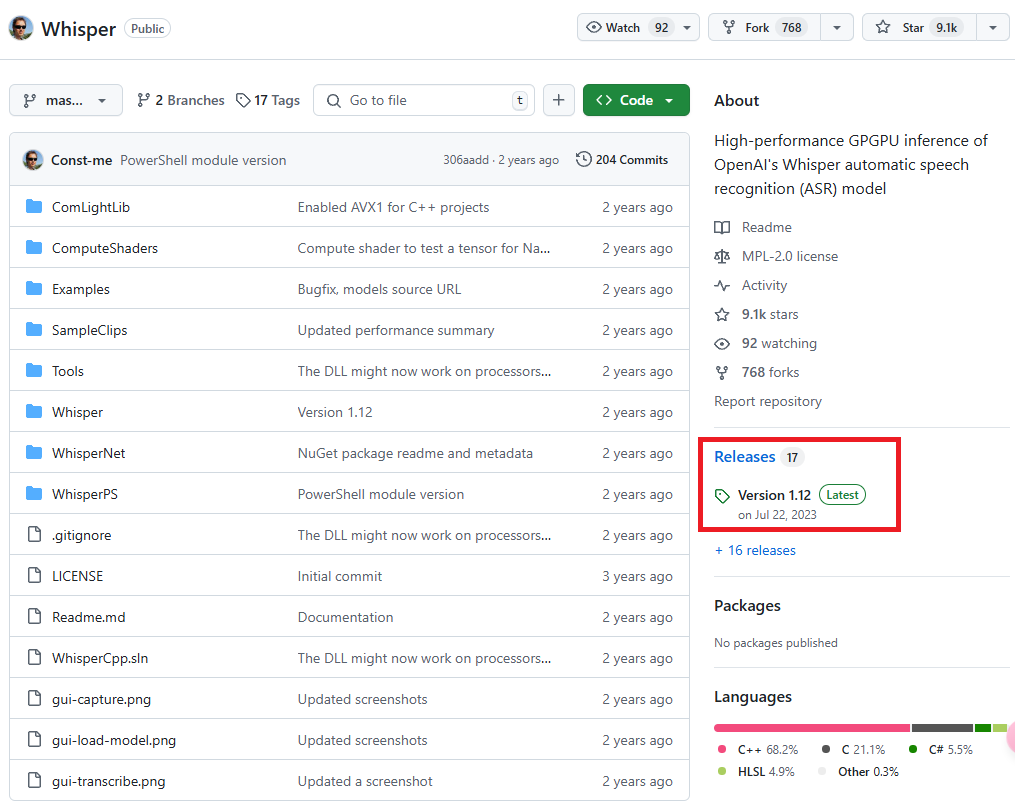
Click on the latest version in the "Releases" section on the right sidebar of the GitHub repository homepage. The current version is Version 1.12.
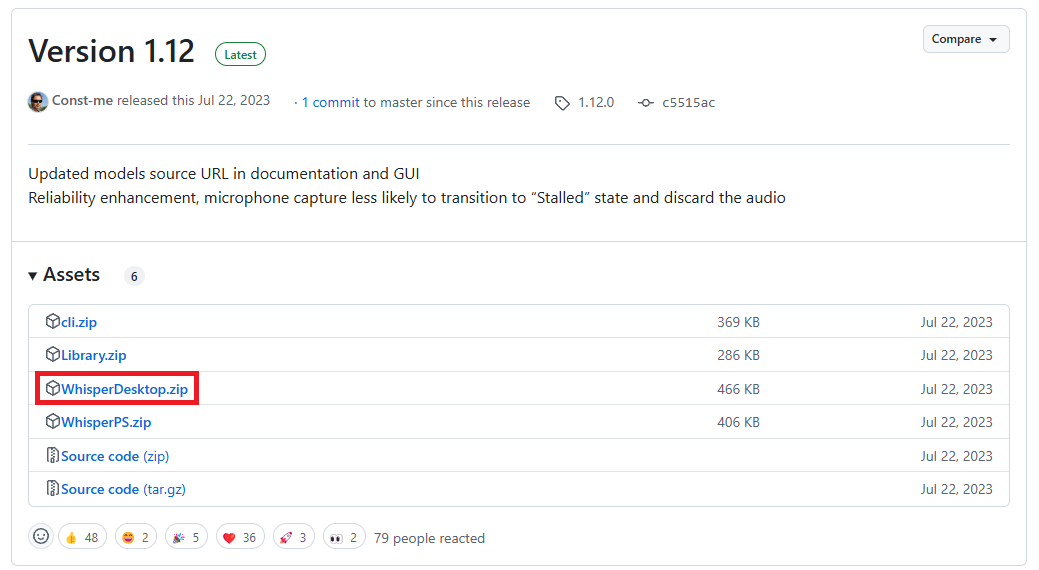
In the "Assets" section of the Release page, click on WhisperDesktop.zip (highlighted in the red box) to download it.
After unzipping, you will see the following three files:
- WhisperDesktop.exe: The executable file.
- Whisper.dll: The library file.
- lz4.txt: The license statement.
Downloading Models
Next, you need to download the models from the following website: Huggingface Whisper.
Model Sizes and Specifications
There are different model sizes available. Those with the .en suffix are English-only versions; there are also other extended models. The author of WhisperDesktop recommends using ggml-medium.bin, as it is the model they primarily use to test the software.
| Size | Parameters | English-only | Multilingual | VRAM Required | Relative Speed |
|---|---|---|---|---|---|
| tiny | 39 M | tiny.en | tiny | ~1 GB | ~32x |
| base | 74 M | base.en | base | ~1 GB | ~16x |
| small | 244 M | small.en | small | ~2 GB | ~6x |
| medium | 769 M | medium.en | medium | ~5 GB | ~2x |
| large | 1550 M | N/A | large | ~10 GB | 1x |
Usage
Run WhisperDesktop.exe.
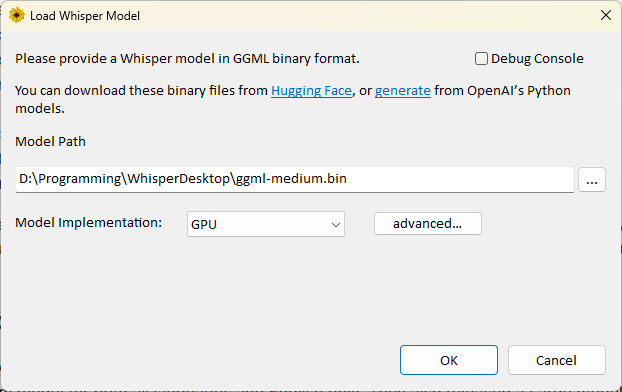
Specify the location of the downloaded model in the "Model Path" field.
Select
GPUfor "Model Implementation" (I am not sure what the other options are for, so I won't explain them here).- If your graphics card is not detected correctly, you can click
advanced...to configure the settings in detail.
- If your graphics card is not detected correctly, you can click
Click
ok.For "Language," select the primary language of the video (for Chinese, there is only a "Chinese" option; the program will automatically determine Traditional or Simplified, though I am not sure what criteria it uses).
If you want to translate to English, check "Translate." However, I found that it often fails when testing with music.
For "Transcribe File," select the audio or video file you want to transcribe.
For "Output Format," you can choose from the following:
- None: No output file.
- Text file (.txt): Plain text file.
- Text with timestamps: Text file with timestamps.
- SubRip subtitles (.srt): Common subtitle format containing timecodes and text.
- WebVTT subtitles (.vtt): Subtitle format for web videos.
Specify the output location and filename.
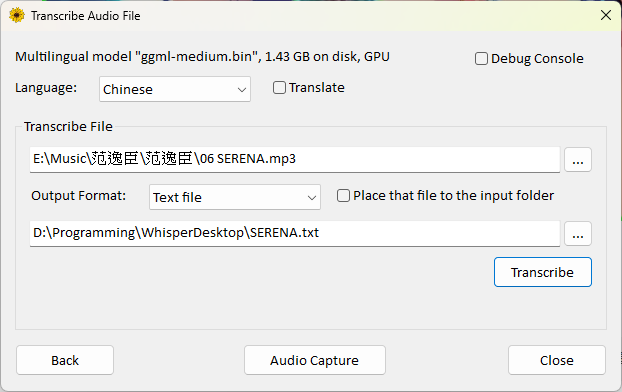
If you do not want to specify a custom output location, you can check
Place that file to the input folder.- This will save the output file in the same location as the input file.
- The filename will be the original filename plus the extension corresponding to the output format.
The "Audio Capture" feature can directly read audio input from a microphone, but my computer could not detect my Bluetooth headset, so I will not explain this part.
Performance Test
Tested using a PNY RTX 4070 Ti Super 16GB Blower graphics card to convert a 5-minute and 16-second mp3 file:
- Using
ggml-large-v3.bintook 22 minutes and 01 seconds, and it did not always succeed (during testing, the file content was blank; it might require a different version of the large model to convert correctly). - Using
ggml-medium.bintook only 11 seconds.
Tested using an i7-12700H integrated graphics (no dedicated GPU) with the same 5-minute and 16-second mp3 file:
- Using
ggml-tiny.bintook 41 seconds. - Using
ggml-small.bintook 4 minutes and 19 seconds. - Using
ggml-medium.bintook 13 minutes and 5 seconds.
The accuracy of the transcribed text improved significantly as the model size increased.
Conclusion
Based on the test results and speed considerations, here are my personal recommendations:
- For users with a dedicated graphics card: I recommend using the
ggml-medium.binmodel. - For users with integrated graphics or older graphics cards:
- Daily use: Choose
ggml-small.bin. This is the smallest acceptable model; the accuracy of theggml-tiny.binmodel is too poor. - Important transcriptions: You can choose
ggml-medium.binand accept the longer processing time to obtain higher accuracy.
- Daily use: Choose
Change Log
- 2025-03-24 Initial document created.
- 2026-01-31 Added recommendation link to the new Faster-Whisper solution.